Actions
L10N_Bug #519
closed
YR
GLS NDSW JPN: New Driver - Update Driver - Driver Installation Failure - Digital Signature Verification Error
L10N_Bug #519:
GLS NDSW JPN: New Driver - Update Driver - Driver Installation Failure - Digital Signature Verification Error
Status:
Known Defect
Priority:
Medium
Assignee:
-
Error Type:
Functional
Test Case:
Language NEX:
Source String:
Current Translation:
Suggested Translation:
Back Translation:
Description
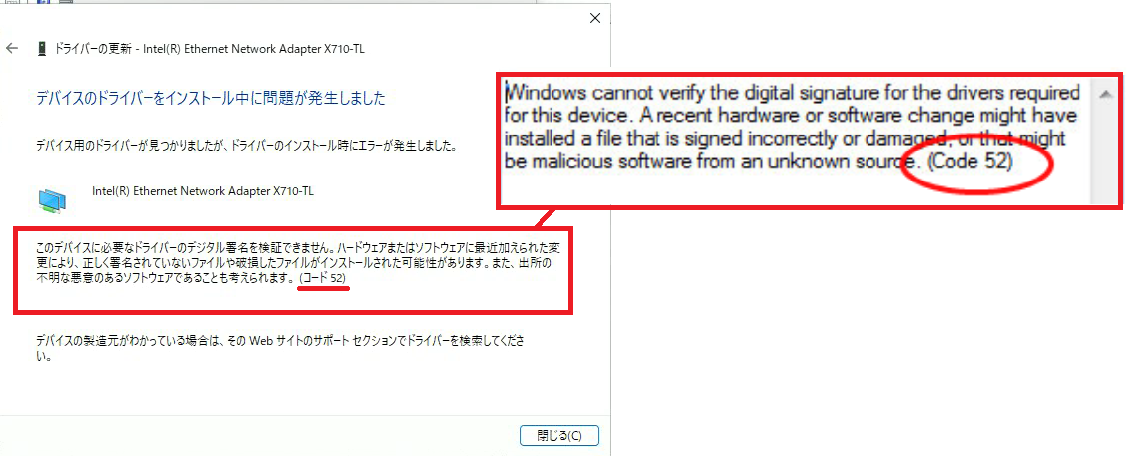
Issue summary: New Driver - Update Driver - Unable to install driver because the digital signature could not be verified.
Steps to reproduce:
- Launch File Explorer.
- In the build folder, navigate to APPS\SETUP\SETUPBD\Winx64, and click SetupBD.exe.
- Check the pop-up message.
- Click OK and check the installation.
- Open Device Manager
- Open Properties of the FLV NIC: Intel® Ethernet Network Adapter X710-TL
- In the Driver tab, click Update Driver button
- Click Browse my computer for drivers (second option)
- Click Let me pick from a list of available drivers on my computer (second option)
- Click Have Disk... button
- Click Browse... button
- Click Have Disk... button
- "Navigate to the folder: D:<build folder>\PRO40GB\Winx64\W11"
- Select i40ean.inf file and click Open button
- Click OK button in the Install From Disk window
- Select the one with the lower number of version such as 0.1.xx.xx for the NIC and click Next
- See the issue.
Expected result: The digital signature should be verified and the driver should installed successfully.
Actual result: Unable to install driver because the digital signature could not be verified.
HW configuration: Carlsville (FVL)
SW configuration: TIC-741971_VC61875 / Windows 11 22H2
Operating System: Windows 11 22H2 x64
Files
JD Updated by Javier Domingo 5 months ago
- Status changed from New to Known Defect
Actions