L10N_Bug #518
closedGLS NDSW JPN: New Driver - Update Driver - Translations out of context for [Install From Disk] pane
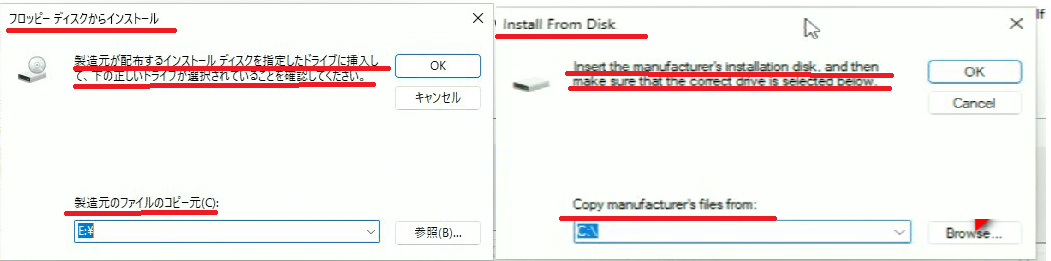
Install From Disk
Insert the manufacture's installation disk, and then make sure that the correct drive is selected below.
Copy manufacture's files from:
フロッピーディスクからインストール
製造元が配布するインストール ディスクを指定したドライブに挿入して、下の正しいドライブが選択されていることを確認してください。
製造元のファイルのコピー元(C):
ディスクからインストール
製造元のインストール・ディスクを挿入し、以下で適切なドライブが選択されていることを確認してください。
製造元ファイルの場所(C):
Description
Issue summary: New Driver - Update Driver - Translations out of context for [Install From Disk] pane. Also "Disk" is mistranslated as "Floppy Disk", and the transliteration of "installation disk" is missing Nakaguro, violating Intel JP Style Guide. Suggested texts also fix a couple of awkward grammar issues.
Steps to reproduce:
Launch File Explorer.
In the build folder, navigate to APPS\SETUP\SETUPBD\Winx64, and click SetupBD.exe.
Check the pop-up message.
Click OK and check the installation.
Open Device Manager
Open Properties of the FLV NIC: Intel® Ethernet Network Adapter X710-TL
In the Driver tab, click Update Driver button
Click Browse my computer for drivers (second option)
Click Let me pick from a list of available drivers on my computer (second option)
See the issues.
Expected result:
[Text 1]
ENU: Install From Disk
JPN: ディスクからインストール
[Text 2]
ENU: Insert the manufacture's installation disk, and then make sure that the correct drive is selected below.
JPN: 製造元のインストール・ディスクを挿入し、以下で適切なドライブが選択されていることを確認してください。
[Text 3]
ENU: Copy manufacture's files from:
JPN: 製造元ファイルの場所(C):
Actual result:
[Text 1]
ENU: Install From Disk
JPN: フロッピーディスクからインストール
[Text 2]
ENU: Insert the manufacture's installation disk, and then make sure that the correct drive is selected below.
JPN: 製造元が配布するインストール ディスクを指定したドライブに挿入して、下の正しいドライブが選択されていることを確認してください。
[Text 3]
ENU: Copy manufacture's files from:
JPN: 製造元のファイルのコピー元(C):
HW configuration: Carlsville (FVL)
SW configuration: TIC-741971_VC61875 / Windows 11 22H2
Operating System: Windows 11 22H2 x64
Files
 Updated by Anonymous