L10N_Bug #518
closedGLS NDSW JPN: New Driver - Update Driver - Translations out of context for [Install From Disk] pane
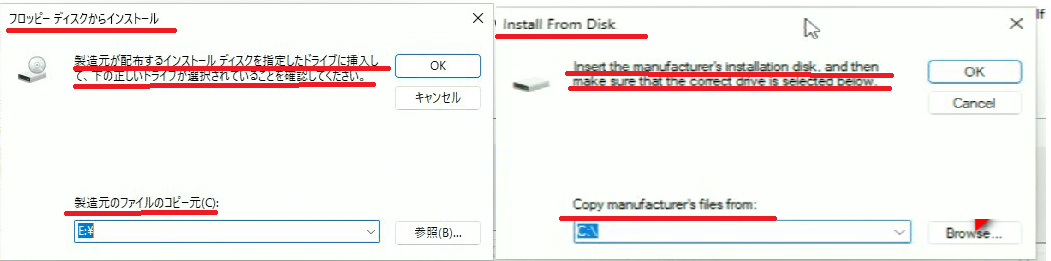
Install From Disk
Insert the manufacture's installation disk, and then make sure that the correct drive is selected below.
Copy manufacture's files from:
フロッピーディスクからインストール
製造元が配布するインストール ディスクを指定したドライブに挿入して、下の正しいドライブが選択されていることを確認してください。
製造元のファイルのコピー元(C):
ディスクからインストール
製造元のインストール・ディスクを挿入し、以下で適切なドライブが選択されていることを確認してください。
製造元ファイルの場所(C):
Description
Issue summary: New Driver - Update Driver - Translations out of context for [Install From Disk] pane. Also "Disk" is mistranslated as "Floppy Disk", and the transliteration of "installation disk" is missing Nakaguro, violating Intel JP Style Guide. Suggested texts also fix a couple of awkward grammar issues.
Steps to reproduce:
Launch File Explorer.
In the build folder, navigate to APPS\SETUP\SETUPBD\Winx64, and click SetupBD.exe.
Check the pop-up message.
Click OK and check the installation.
Open Device Manager
Open Properties of the FLV NIC: Intel® Ethernet Network Adapter X710-TL
In the Driver tab, click Update Driver button
Click Browse my computer for drivers (second option)
Click Let me pick from a list of available drivers on my computer (second option)
See the issues.
Expected result:
[Text 1]
ENU: Install From Disk
JPN: ディスクからインストール
[Text 2]
ENU: Insert the manufacture's installation disk, and then make sure that the correct drive is selected below.
JPN: 製造元のインストール・ディスクを挿入し、以下で適切なドライブが選択されていることを確認してください。
[Text 3]
ENU: Copy manufacture's files from:
JPN: 製造元ファイルの場所(C):
Actual result:
[Text 1]
ENU: Install From Disk
JPN: フロッピーディスクからインストール
[Text 2]
ENU: Insert the manufacture's installation disk, and then make sure that the correct drive is selected below.
JPN: 製造元が配布するインストール ディスクを指定したドライブに挿入して、下の正しいドライブが選択されていることを確認してください。
[Text 3]
ENU: Copy manufacture's files from:
JPN: 製造元のファイルのコピー元(C):
HW configuration: Carlsville (FVL)
SW configuration: TIC-741971_VC61875 / Windows 11 22H2
Operating System: Windows 11 22H2 x64
Files
YR Updated by Yoshimi Ray ja_JP 5 months ago
Two required steps were missing:
Steps to reproduce:
- Launch File Explorer.
- In the build folder, navigate to APPS\SETUP\SETUPBD\Winx64, and click SetupBD.exe.
- Check the pop-up message.
- Click OK and check the installation.
- Open Device Manager
- Open Properties of the FLV NIC: Intel® Ethernet Network Adapter X710-TL
- In the Driver tab, click Update Driver button
- Click Browse my computer for drivers (second option)
- Click Let me pick from a list of available drivers on my computer (second option)
- Click Have Disk... button
- Click Browse... button
- See the issues.
JD Updated by Javier Domingo 5 months ago
- Status changed from New to Confirmed
 Updated by Anonymous 5 months ago
- Related to L10N_Bug #517: GLS NDSW JPN: New Driver - Update Driver - translations out of context for [Browse for drivers on your computer] pane added
Updated by Anonymous 5 months ago
- Status changed from Confirmed to Need More Info
- Assignee set to Javier Domingo
@Javier Domingo Same as ticket 517.
These strings are not in our files, because they are part of the Windows OS strings for the Device Manager application. We have no control over these translations as they are part of the OS. I am curious to understand if the reported issues are critical because I would assume Microsoft went through a certain layer of review/approval for the current strings.
Is this really something we've never encountered before either?
Updated by Anonymous 5 months ago
- Status changed from Need More Info to Investigating
JD Updated by Javier Domingo 5 months ago
- Status changed from Investigating to Known Defect
JD Updated by Javier Domingo 5 months ago
- Assignee deleted (
Javier Domingo)